This article is based on Google’s official published tools, verified privacy platform documentation, and FTC consumer guidance. All steps described are legal, free, and available to any US resident. This is not legal advice consult a privacy attorney for complex situations.
Google yourself. What comes up?
For most Americans, the answer is uncomfortable. A home address. A phone number. An employer. Sometimes a satellite image of the house. All of it aggregated from public records and data broker databases legally collected, publicly searchable, and available to anyone with an internet connection and thirty seconds.
The exposure of sensitive information online jeopardizes your safety and puts you at real risk of identity theft. Removing search results containing this information is a practical step most people never take not because it’s hard, but because they don’t know the tools exist.
They exist. They’re free. Here’s exactly how to use them.
Step 1: Google’s “Results About You” Tool Start Here
In 2023 Google launched the Results About You dashboard, significantly expanded since then. As of early 2026, the tool can flag search results containing government-issued ID numbers and makes it easier to request removal of non-consensual explicit images.
This is the most powerful free tool available and most people have never opened it.
How to use it: Open the Google app, tap your profile photo, and select “Results about you.” You can also visit myactivity.google.com/results-about-you directly. Add the names you go by, along with personal information you want monitored home address, phone number, email address. Google’s first scan typically takes about six hours. After that, it monitors continuously. When the tool finds a search result containing your information, it sends you a notification. Navigate to the “To review” tab to see flagged results.
What Google will remove under its current policy: home address, phone numbers, email addresses, government-issued ID numbers, bank account or credit card details, login credentials, medical records, and non-consensual explicit images.
What Google will not remove: publicly available news coverage, court records, government documents, and information you yourself made public. Removal from Google’s index doesn’t delete the information from the source website it just makes it harder to find via search.

Step 2: The Data Broker Problem Your Biggest Exposure
Google’s tool fixes what Google shows. It doesn’t fix the underlying problem: data brokers.
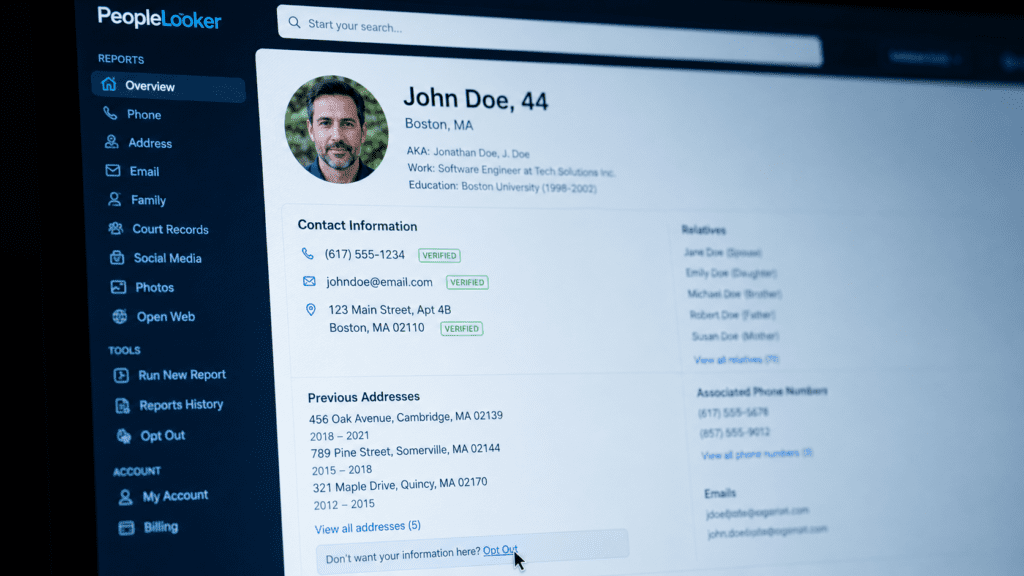
People-search site profiles contain dates of birth, location history, legal actions, bankruptcies, voter registrations, and more. Sites like Whitepages, Spokeo, BeenVerified, Radaris, FastPeopleSearch, and TruePeopleSearch aggregate this information from public records and sell or display it freely.
Privacy experts note that data brokers maintain thousands of data points on individuals from shopping habits to online activity. Even if you cannot erase all of it, reducing what shows up in a simple Google search is an important step in protecting yourself from scams and unwanted attention.
The free removal process for each site:
Search for yourself on each major people-search site. Find the opt-out page most data brokers have an opt-out or removal form linked at the bottom of their website. Submit removal requests follow each site’s process, which may require identity verification. Wait and verify processing times range from 24 hours to several weeks. Check back to confirm removal. Repeat regularly data brokers frequently re-add information from updated public records, so one-time removal is rarely permanent.
The major sites to target first, in order of priority: Whitepages, Spokeo, BeenVerified, Radaris, TruePeopleSearch, FastPeopleSearch, Intelius, and PeopleFinder. Each has its own opt-out process search “[site name] opt out” to find the direct removal page.
This process takes time expect two to four hours to work through the major sites. But it’s the most impactful privacy action most Americans never take.
Step 3: Google’s Formal Removal Request For Specific Pages
For content on websites that won’t respond to direct contact requests, Google provides a formal removal tool.
Go to Google’s removal tool and follow the instructions. You may be asked to provide more details. Collect links and screenshots of pages showing your information before submitting Google requires specific URLs, not general descriptions.
The removal tool is at: google.com/webmasters/tools/removals
Google reviews each request individually. Approvals typically take one to three weeks. If a request is denied, you can appeal with additional documentation showing why the content qualifies for removal under Google’s current policy.
Step 4: Social Media Audit The Source Most People Miss
Your first step for reducing your searchable footprint is to delete or modify social media accounts at minimum changing your name and removing location information.
The practical checklist: Set all existing social media profiles to private. Remove your real address, phone number, and employer from every platform’s profile settings. Review tagged photos that include location metadata. On LinkedIn, disable the public profile option if you don’t need professional visibility. On Facebook, set your profile search visibility to “Friends Only.”
This doesn’t delete historical data that’s already been indexed but it stops the continuous feeding of new personal information into publicly searchable profiles.

Step 5: Monitor Continuously
One-time removal isn’t enough. Data brokers re-populate from public records regularly a new voter registration, a property record update, or a new court filing can re-surface your information within weeks.
Google’s Results About You tool monitors continuously after setup and sends notifications when new results containing your information appear. Use this as your ongoing alert system when a new result appears, submit a removal request immediately.
Set a calendar reminder every 90 days to re-search your name on the major data broker sites and submit new opt-out requests where your information has reappeared.
What You Cannot Remove Honestly
It may be impossible to remove yourself from all public records maintained by government websites. Court records, property ownership records, business registrations, and voter rolls are legally public in most US states.
Permanent removal from Google search is achievable for specific types of personal information addresses, phone numbers, financial data, and government IDs. However, achieving and maintaining broad invisibility requires continuous effort.
The goal isn’t perfect invisibility that’s not achievable for most people. The goal is making your personal information meaningfully harder to find, reducing your exposure to identity theft, stalking, and data-driven scams.
Scammers do not need help finding you. Taking advantage of Google’s tool to hide sensitive details is one of the simplest and most effective ways to take back a little control of your privacy.
That control is worth the two hours it takes to set up.
Note: Privacy laws vary by state and country. California residents have additional rights under CCPA. EU residents have the Right to Be Forgotten under GDPR. Consult a privacy attorney for situations involving harassment, stalking, or persistent content that legal tools don’t resolve.
© AiwalaNews | Global Tech & Privacy Edition | May 202
Read Also:
- 🔗 The App on Your Phone Right Now That’s Selling Your Location to Advertisers
- 🔗 Why Incognito Mode Doesn’t Do What 90% of Americans Think It Does
