
You mention something out loud running shoes, a vacation spot, a specific brand and minutes later, an ad for exactly that shows up on your phone. For many users in 2026, it doesn’t feel like a coincidence.
The unsettling truth is that the technical capability genuinely exists. There’s a real permission setting on your phone buried a few menus deep that determines whether an app’s microphone access ends the moment you close it, or quietly continues running in the background.
The Setting That Changes Everything
Every smartphone has a microphone permission with multiple tiers, and most people only ever see the first prompt they never check which tier they actually agreed to.
Android organizes microphone access into four categories: Permanent permit, where apps can access the microphone at all times, even in the background. Permission during use, where apps only access the microphone when the application is in the foreground. Always ask, requiring permission each time. And Without permission, where the app has no microphone authorization at all.
That first categor “Permanent permit,” often labeled “Allow all the time” is the exact setting this entire article is about. There is absolutely no logical reason a simple mobile game or calculator app needs that level of access, yet many apps request it anyway.
If you previously granted an app “Always On” permission when you installed it, it can access your microphone in the background that is exactly why checking your app permissions regularly is so important.
Why Apps That Have No Reason to Listen Still Ask
This is the part that genuinely surprises most people once they actually look.
In 2026, apps don’t just request microphone access once they continuously optimize permissions using ongoing background processes. This is why even flashlight, wallpaper, or calculator apps sometimes request microphone access.
Many popular games and social apps request microphone permissions, sometimes enabling features you’ll never actually use and once granted, those permissions could allow background listening without your consistent awareness.
What Your Phone Actually Prevents And What It Doesn’t
Here’s the genuinely reassuring part, followed immediately by the genuinely concerning part.
Most operating systems restrict constant background recording apps can only access audio while active, if permission is granted. That’s the official safeguard built into modern smartphones. But the safeguard only holds up if you haven’t granted the “Always” tier of access.
It is technically possible to have the microphone listen as a service outside the main application, and lots of apps already do this though it’s not all that common. Even Google Assistant needs to be actively triggered to listen for a command.
The honest, evidence-based answer is this: your phone isn’t “spying” in the way the most extreme myths suggest but unchecked permissions and aggressive background AI can absolutely compromise your privacy. Major tech giants constantly deny secretly listening to private conversations, and the more accurate reality is simpler: many applications legally request access to your microphone, camera, and GPS location the moment you install them and if you blindly tap “Accept,” you’re voluntarily giving away your digital privacy.
How Your Phone Actually Tries to Warn You
Both major operating systems have built visible indicators specifically to catch this most people simply never notice them.
On devices running Android 12 or higher, when an app accesses the microphone or camera, an icon appears in the status bar and if the app is in immersive mode, the icon appears in the upper-right corner of the screen.
On iPhones, when an app uses the microphone, an orange dot appears as a privacy feature. If you’ve ever glanced at your status bar and seen a small orange or green dot you didn’t recognize, that was your phone actively telling you something was listening in real time.

Step-by-Step: How to Actually Fix This Right Now
This takes about five minutes and works on both major platforms.
On Android:
Open your phone’s app permissions list, organized by category, then simply tap the app and choose a different permission status for example, changing from “Always Allow” to “Allow only while in use.”
You can also completely cut off microphone access for all apps at once through Quick Settings swipe down from the top of the screen, locate the microphone and camera toggles, and tap to disable global access whenever you want maximum privacy.
On iPhone:
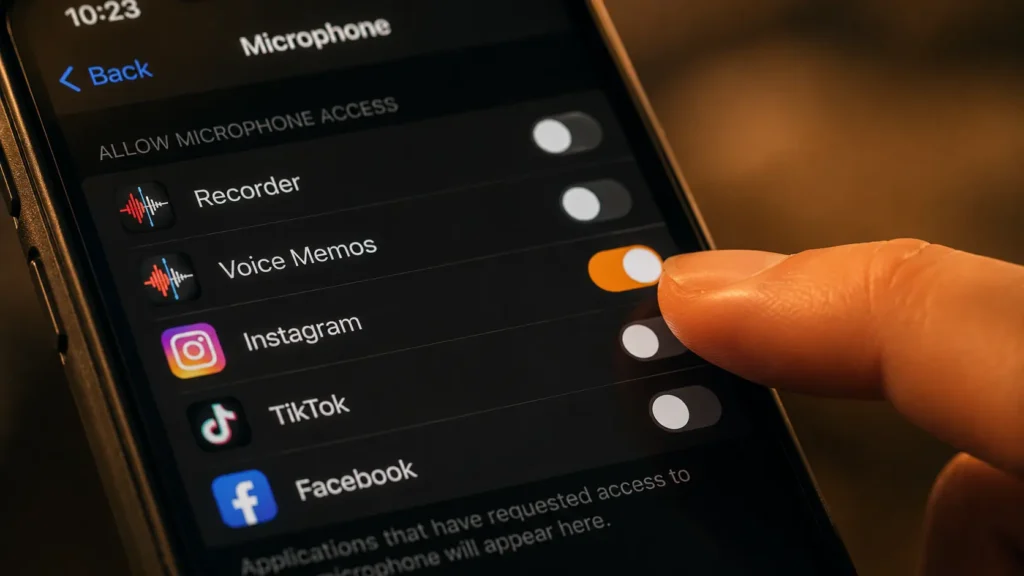
Open Settings, then Privacy & Security, then Microphone, and review which apps currently have access toggling off any app that doesn’t genuinely need it.
Also check Background App Refresh under Settings, then General this setting can wake apps and allow audio recording even when the screen is off, and you can disable it globally or for individual apps.
On both platforms:
Recommendations for 2026 include conducting a full audit of microphone permissions across every app on your device, not just the ones you use daily.
The Risk You Probably Haven’t Considered
This issue extends beyond your own device in a way most people never think about.
Your privacy isn’t just about your own phone if your significant other, or any other household member, has apps with microphone access enabled, those apps could be listening whenever you’re nearby, even if you’re not using their device directly. The same logic applies to your kids’ phones and tablets, since many popular games and social apps request microphone permissions for features you’ll never use.
This means confidential or sensitive conversations could be unintentionally exposed simply because you’re within earshot of someone else’s device.
The Safest Default Going Forward
Security researchers consistently recommend the same baseline setting for nearly every app on your phone.
The privacy-conscious approach keeps microphone access restricted to times when the app is actively visible, reducing the risk of background listening “while using the app” is enough for the overwhelming majority of everyday use cases.
Only essential apps phone calls and voice assistants should retain “Always” microphone access; voice assistants are convenient, but not mandatory.
The Bottom Line
The myth that your phone secretly records every conversation isn’t quite accurate. The reality is both simpler and, in its own way, more concerning: the most crucial step you can take today is restricting microphone and exact location access to “Only While Using the App.” That one setting buried a few taps deep in permissions you probably approved months or years ago without thinking is the actual difference between an app that listens only when you’re using it, and one that doesn’t.
Five minutes in your settings menu is all it takes to find out which one you’ve been living with.
Read Also:
- 🔗 The Invisible Companies Buying and Selling Your Data Every Day
- 🔗 The Dark Technology Behind Every “Recommended for You” — How Big Tech Controls What You See
© AiwalaNews | Global Tech & Privacy Edition | June 2026
