This article is based on peer-reviewed prompt engineering research, documented platform features, and verified testing by AI researchers. Specific techniques are attributed to their original sources.
In 2026, more than 2.5 billion prompts flow through ChatGPT every single day. People use it to write, to research, to work through problems they cannot crack on their own. ChatGPT is infrastructure now like search was, ten years ago.
And yet, frustration is surprisingly common even among heavy users. Answers that orbit the question without landing. Responses packed with words but thin on substance. Outputs that took three back-and-forth exchanges to get anywhere useful.
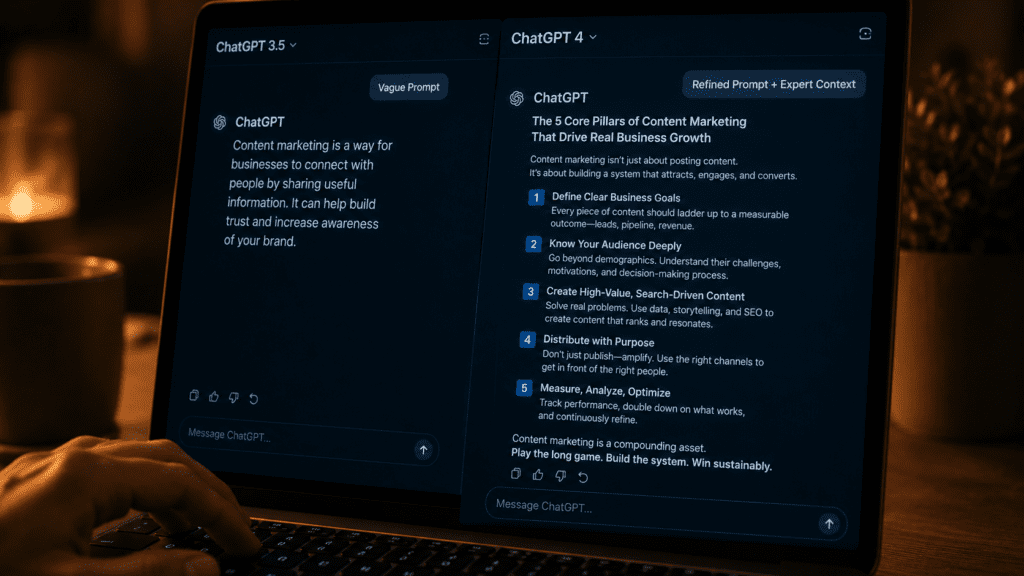
That is not a ChatGPT problem. They get bad results because their prompts leave too much room for guesswork. Small changes in how you ask lead to massive changes in what you get back.
The gap between amateur and expert prompting is now measurable: research-backed techniques consistently improve output quality by 20 to 60 percent on standardized benchmarks.
Here are the techniques behind that gap documented, specific, and immediately usable.
The Setting Nobody Opens: Custom Instructions
Spend five minutes inside the settings panel before you write a single prompt and the difference shows up immediately. Get those configured properly and the prompts themselves become easier to write, the results more predictable, and the whole experience more consistent.
Under Settings → Personalization → Custom Instructions, you tell ChatGPT two things: what it should know about you, and how it should respond. Most users have never touched this.
Set your role, preferences, and output format once. ChatGPT applies them to every conversation so you don’t repeat yourself every single session.
A practical example that works immediately:
“I am a [your profession]. I have expert-level knowledge of [your field]. Always respond without unnecessary preamble. Use specific examples over general statements. When uncertain, say so explicitly rather than hedging throughout.”
That single configuration change removes the generic, hedge-everything tone that makes most ChatGPT outputs feel like they were written by a committee.

Chain-of-Thought: Making ChatGPT Think Before It Answers
Chain of Thought (CoT) forces the model to “think out loud.” By adding “Let’s think step-by-step” to your prompt, the model processes complex instructions sequentially which significantly reduces logical errors.
This technique, documented in peer-reviewed research from Google Brain, exploits how large language models actually work. Without explicit instruction to reason through a problem, the model pattern-matches to the most statistically likely response which is often a confident-sounding generalization. When forced to show its reasoning, the model catches its own errors before they reach the output.
For any analytical task — comparing options, solving a problem, evaluating a decision this addition to your prompt consistently produces noticeably better outputs:
“Think through this step by step before giving me your final answer.”
Six words. Measurably better results. The research is unambiguous on this one.
The Persona Pattern: Eliminating Generic Outputs
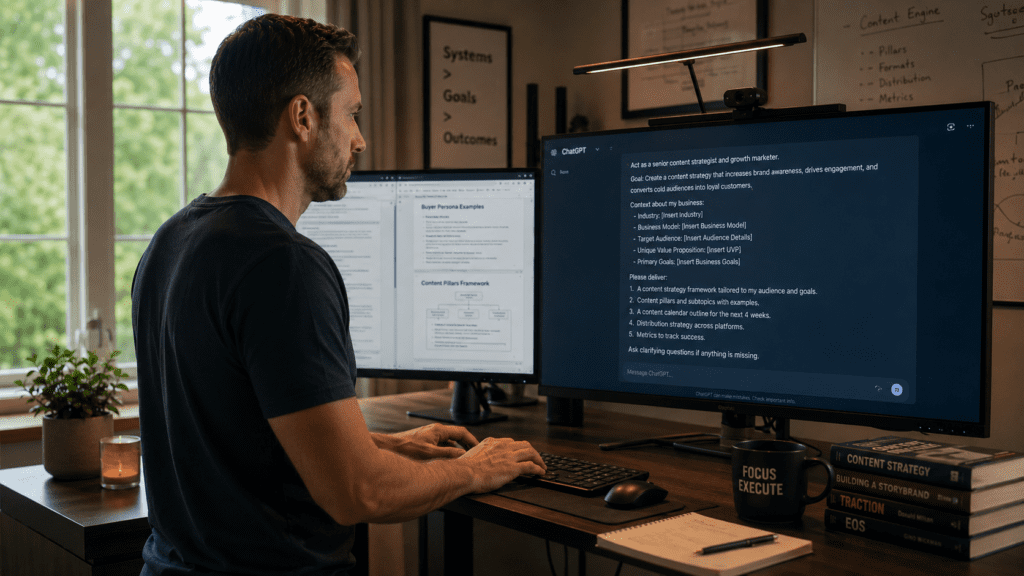
The Persona Pattern aims to eliminate generic output by having the LLM adopt a specific point of view. Prompt pattern: “From now on, act as [persona]. Pay close attention to [details to focus on]. Provide outputs that [persona] would regarding the input.”
The difference between “write me a marketing email” and “act as a direct-response copywriter with 15 years of B2B SaaS experience. Write a cold email to a CFO explaining why our expense management software saves time” is the difference between a generic template and something you can actually send.
The persona doesn’t just change the tone. It changes the knowledge frame the model draws from, the assumptions it makes about the audience, and the specific details it chooses to include or omit.
For research tasks: “Act as a skeptical senior analyst who identifies weaknesses in arguments before presenting conclusions.”
For writing tasks: “Act as an editor at The Economist precise, unsentimental, and allergic to vague claims.”
The specificity of the persona is directly proportional to the quality of the output.
The Question Refinement Pattern: Let ChatGPT Fix Your Prompt
The Question Refinement Pattern flips the interaction. Instead of prompting directly, you ask the model to offer a better question that includes specific information relevant to your use case before answering.
In practice:
“Before answering my question, suggest a better version of this question that would get me a more useful answer. Then answer the better question. My question: [your question]”
This works because the model often has a clearer sense of what information is needed than the user does when they’re starting from scratch on an unfamiliar topic. The refinement step surfaces the missing context and the answer that follows is consistently more useful than if you’d asked the original question directly.
Model Selection: The Overlooked Variable
ChatGPT no longer has just one model. As of 2026, you pick from several options and choosing the right one makes a real difference in speed and quality. The default model is fast, accurate, and handles everyday tasks like writing, research, summarizing, and translation. The reasoning model thinks step-by-step before answering it’s slower but significantly better at complex math, deep research, coding, and building spreadsheets or presentations.
The model choice often matters as much as the prompt itself. GPT-5.3 is fastest for everyday tasks. o3 is better when you need careful reasoning. o4-mini is a good middle ground. CSMonitor.com
Most users never switch models. They run analytical reasoning tasks through the default model and wonder why the outputs feel shallow while the reasoning model sits unused one click away.
The Prompt Diagnosis Template
This template consistently produces the most dramatic improvement for users who feel stuck.
“I want to get better results from ChatGPT for [task type]. What I’ve been doing: [paste your current prompt]. What I’m getting: [describe the output and what’s wrong]. What I actually want: [describe the ideal output]. Help me: 1) diagnose what’s wrong with my current prompt, 2) rewrite it with specific improvements, 3) explain each change and why it matters.”
This meta-prompt turns ChatGPT into a prompt engineer for your own workflow and the diagnosis it provides is often more instructive than any general guide.
The Honest Bottom Line
Prompt engineering in 2026 is no longer a collection of tricks. It’s a $6.95 billion discipline with its own tools, governance standards, and job market growing at 33% annually.
But you don’t need to be a prompt engineer. You need five things: Custom Instructions configured once. Chain-of-thought added to analytical prompts. A specific persona for any writing or research task. The right model for the right task. And the willingness to let ChatGPT diagnose its own failures.
Clear prompts reduce back-and-forth exchanges and cut down on editing. When ChatGPT understands the task from the first message, usable answers come back faster and require less rework. Over time, that compounds.
The model hasn’t changed. The way you talk to it is the only variable you control.
© AiwalaNews | Global Tech & Privacy Edition | May 2026
Read Also:
- 🔗 7 Free AI Tools in 2026 That Are Better Than Paid Ones
- 🔗 The $0 AI Stack That Replaced My $500/Month SaaS Tools
