It is a familiar routine.
You charge your iPhone to one hundred percent before leaving home. By late afternoon, the battery is already running low even though you have barely watched any videos or played games.
Most people immediately blame the battery itself.
Others assume it is simply time to upgrade to a newer iPhone.
Surprisingly, one of the biggest reasons behind unnecessary battery drain may already be hiding inside your settings menu.
It is called Background App Refresh.
This feature has existed on iPhones for years, yet many users never think about it after setting up their device. While it serves a useful purpose, it can also quietly consume battery power by allowing apps to update even when you are not actively using them.
The good news is that understanding how it works can help you decide whether you actually need it.
What Is Background App Refresh
Imagine walking into your office every morning and discovering that someone had already organized your desk, opened your emails, and prepared today’s documents before you arrived.
That is essentially what Background App Refresh does.
Instead of waiting for you to open an application, iOS allows certain apps to refresh their content in the background.
Your news app downloads fresh headlines.
Your weather app updates forecasts.
Social media apps check for new posts.
Shopping apps refresh promotions.
Cloud services synchronize files.
All of this can happen without you opening the apps yourself.
It creates a smoother experience, but those background activities require processing power and network access.
One Setting Affects Dozens Of Apps
Many users think only one or two applications refresh in the background.
The reality is often very different.
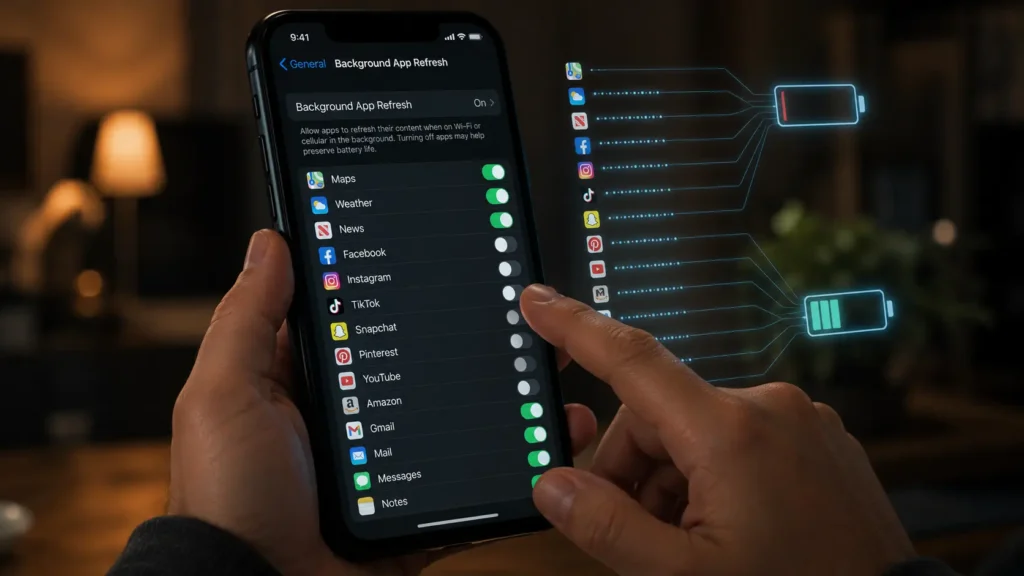
Open your iPhone settings and you may discover dozens of installed apps with Background App Refresh enabled.
Some of those apps provide genuine value.
Navigation apps may prepare maps.
Messaging apps keep conversations current.
Cloud storage services synchronize important files.
Others, however, may refresh information that you rarely use.
If an application is opened only once every few weeks, constantly updating it in the background offers very little benefit.
A Real World Example
Consider Sarah, a marketing professional in Chicago.
She noticed her iPhone battery rarely lasted until dinner.
Instead of replacing the battery, she reviewed her settings.
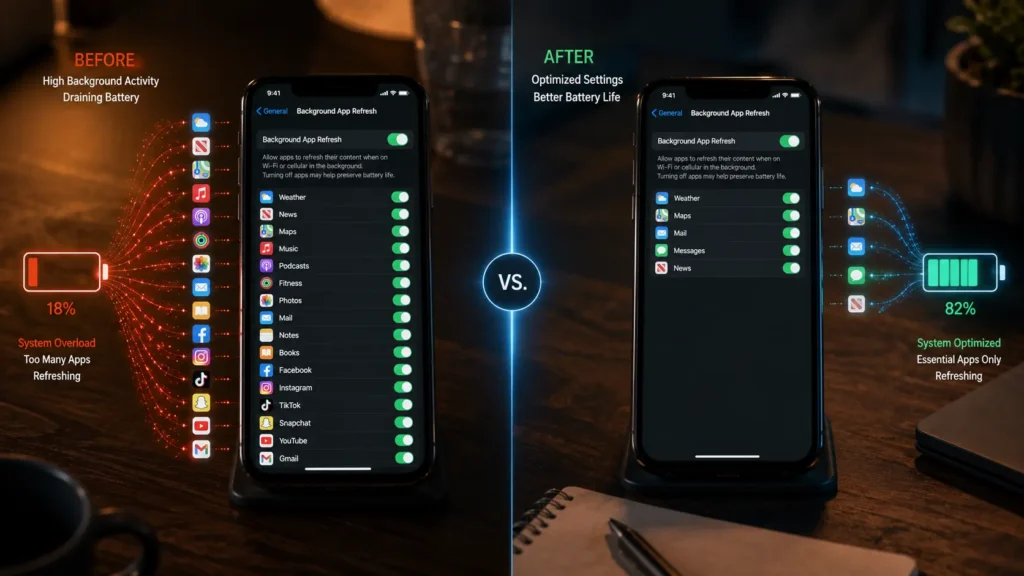
She found more than forty apps allowed to refresh in the background, including games she had not opened for months, shopping apps, travel services, and old food delivery apps.
After disabling Background App Refresh for the apps she rarely used, her battery consistently lasted several hours longer during a normal workday.
Nothing else changed.
She simply stopped unnecessary background activity.
Does Turning It Off Affect Everything
Not at all.
Many people worry that disabling Background App Refresh will prevent messages or phone calls from arriving.
That is not how it works.
Important notifications continue using Apple’s push notification system.
Phone calls, text messages, emergency alerts, and many messaging notifications still arrive normally.
The biggest difference is that some apps update their content only after you open them.
For many users, waiting an extra second for a weather forecast or shopping catalog is a small trade off for better battery life.
Another Hidden Battery Drainer
Background App Refresh is only one part of the picture.
Location Services can also affect battery life when dozens of apps continuously request your location.
Many applications only need location while you are actively using them.
Changing unnecessary permissions from Always to While Using The App can reduce background activity while maintaining important functionality.
Reviewing these permissions every few months is a simple habit that many users overlook.

Screenshot Suggestion
Screenshot: Show the Settings menu with General, followed by Background App Refresh, displaying a long list of apps with individual switches. Highlight several unnecessary apps turned off while essential apps such as Maps and Messages remain enabled. Add a second screenshot showing Location Services with the While Using The App option selected for selected applications.
How Apple Balances Performance And Battery
Apple does not enable these features without reason.
Many background processes improve convenience.
Your calendar stays current.
Cloud photos synchronize automatically.
Music downloads complete while the screen is locked.
Email updates without manual refresh.
The system also uses artificial intelligence to reduce unnecessary background activity based on how frequently you use each application.
Even so, no automated system perfectly understands every person’s habits.
That is why manually reviewing your settings remains worthwhile.
Simple Battery Habits That Actually Help
Battery life is rarely improved by one dramatic change.
Instead, several small adjustments often make the biggest difference.
Review Background App Refresh regularly.
Limit unnecessary location access.
Keep iOS updated.
Enable Low Power Mode when needed.
Reduce screen brightness in bright environments.
Remove apps you no longer use.
These habits reduce unnecessary activity without affecting everyday performance.
The Bigger Picture
Modern smartphones perform thousands of background tasks every day.
Most are designed to improve convenience rather than waste battery.
However, over months and years, your iPhone accumulates applications that continue refreshing, synchronizing, checking servers, and requesting updates even after you stop using them regularly.
That silent activity gradually consumes battery power.
The solution is not turning every feature off.
It is understanding which features actually benefit you.
A five minute review of your settings may give your battery several extra hours throughout the day without spending a single dollar on new hardware.
The next time your iPhone battery seems to disappear faster than expected, do not assume the battery is failing.
The biggest culprit may simply be a setting that has been quietly working in the background since the day you first turned on your phone.
Read Also
Read also: https://aiwalanews.com/how-websites-recognize-you-even-without-cookies/
Read also: https://aiwalanews.com/what-happens-inside-googles-data-centers-when-you-search/
© AiwalaNews | Global Tech & Privacy Edition | April 2026
