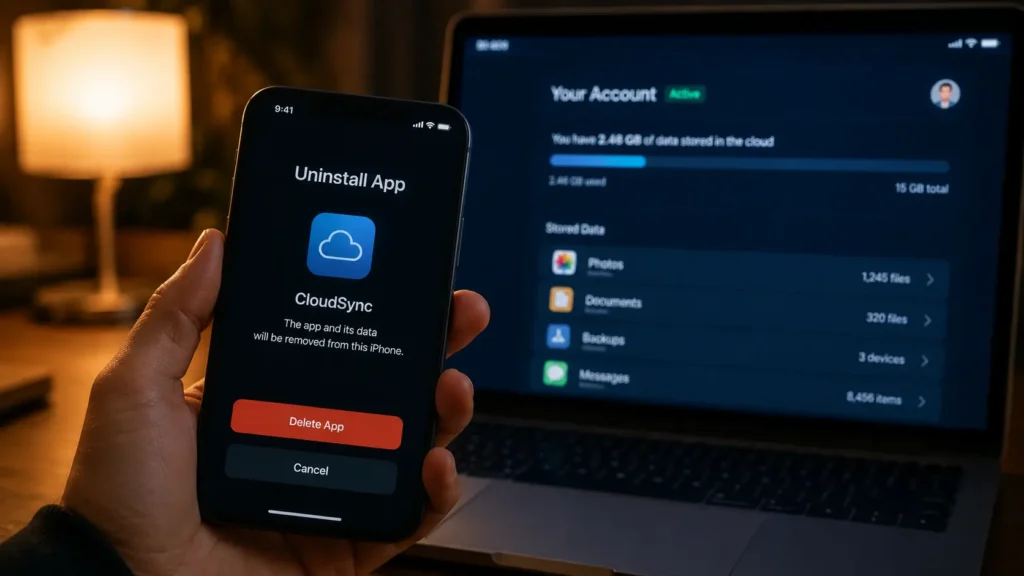
Many people believe uninstalling an application is the same as erasing their digital footprint. Tap Delete, watch the icon disappear, and assume your information is gone forever.
Unfortunately, that’s rarely how modern digital services work.
While removing an app clears it from your phone, it often doesn’t delete the personal data stored on the company’s servers. Your account information, purchase history, location records, search activity, uploaded files, and even advertising profiles may continue to exist long after the app disappears from your device.
Understanding this distinction is becoming increasingly important as companies rely on cloud infrastructure, artificial intelligence, and data analytics to personalize services and improve products.
The Difference Between Deleting an App and Deleting Your Account
When you uninstall an app, you’re only removing the software from your smartphone.
The information you’ve already shared usually remains stored remotely in secure or sometimes not so secure cloud databases.
This includes information such as:
- Account details
- Email address
- Phone number
- Photos or uploaded files
- Purchase history
- Search history
- Location data
- Device identifiers
- Preferences and settings
Think of it this way: deleting the app is like throwing away your house key. The house still exists you’ve simply removed your way of entering it.

Why Companies Keep Your Data
There are several legitimate reasons organizations retain information after an app is removed.
Some data is needed to:
- Restore your account if you reinstall the app.
- Process refunds or subscriptions.
- Prevent fraud and account abuse.
- Meet financial or legal recordkeeping requirements.
- Improve AI models and product performance using aggregated data.
- Maintain security logs.
Many companies also retain anonymized or aggregated information that can no longer be directly linked to an individual user but still helps analyze trends and improve services.
However, privacy policies often allow certain categories of information to be retained for months or even years depending on applicable laws and company practices.
Cloud Storage Changes Everything
Today’s apps rarely store your information only on your phone.
Instead, most rely on cloud computing, where data is synchronized across multiple servers worldwide.
This allows you to:
- Log into multiple devices.
- Restore data after buying a new phone.
- Continue conversations across platforms.
- Synchronize photos, documents, and preferences instantly.
The convenience is enormous but it also means uninstalling the app doesn’t automatically remove those cloud copies.
What About AI and Personalization?
Modern apps increasingly use artificial intelligence to personalize recommendations, detect fraud, improve search results, recognize speech, and filter spam.
To provide these features, systems may process:
- Previous interactions
- Usage patterns
- Voice commands
- Search behavior
- Device information
- Preference settings
Many AI-powered features process information directly on your device, while others rely on encrypted cloud processing.
Deleting the application usually doesn’t erase the historical data already associated with your account unless you specifically request account deletion or use built-in privacy tools.

Can Companies Keep Your Data Forever?
Not necessarily.
Many privacy regulations now require organizations to provide users with greater transparency and control over personal information.
Depending on your country or region, you may have rights to:
- Access your stored data.
- Correct inaccurate information.
- Download a copy of your information.
- Request deletion.
- Restrict certain types of processing.
- Opt out of personalized advertising.
That said, companies may legally retain certain information for security investigations, fraud prevention, tax obligations, or regulatory compliance.
How to Actually Remove Your Data
If your goal is true privacy not just freeing storage space you’ll usually need to do more than uninstall the app.
A better approach includes:
- Sign in to the account.
- Download important information you wish to keep.
- Visit the app’s Privacy or Account Settings section.
- Request Account Deletion, not simply logout.
- Revoke permissions such as microphone, camera, contacts, and location if you no longer use the service.
- Remove connected devices where applicable.
- Watch for a confirmation email explaining when deletion will be completed.
Many companies require several days or even weeks to fully process deletion requests.
Read the Fine Print
Privacy policies aren’t the most exciting reading material, but they explain:
- What information is collected.
- Why it’s collected.
- How long it’s retained.
- Whether it’s shared with partners.
- How deletion requests are handled.
Understanding these policies helps you make informed decisions before installing new apps.
The Bottom Line
Deleting an app is often only the first step not the final one.
In today’s cloud-connected world, your personal data frequently lives beyond your device. While many companies have legitimate reasons for retaining information, users also have growing rights to understand, manage, and request deletion of their data.
The best digital privacy strategy combines informed choices, careful permission management, and using the privacy controls that many services now provide.
Removing an app clears your phone.
Deleting your account—and understanding what happens to your data afterward is what truly gives you greater control over your digital footprint.
Read Also
- Read also: How AI Processes Your Voice Without Constantly Listening – https://aiwalanews.com/
- Read also: What Mobile Wallet Tokenization Really Means for Your Privacy – https://aiwalanews.com/
© AiwalaNews | Global Tech & Privacy Edition | April 2026
