This article is based on peer-reviewed research from Washington University in St. Louis published in Small (2026), Stanford University electrochemistry documentation, ScienceInsights battery analysis, and SlashGear’s March 2026 battery chemistry reporting. This is for educational purposes.
You plugged in your phone at 7% battery. By 7:20 AM it was at 80% fast charging working exactly as advertised. By 8:10 AM it finally hit 100%. That last 20% took almost as long as the first 73%.
You probably assumed it was your charger slowing down, or a software throttle, or just one of those inexplicable phone things.
It’s none of those. It’s chemistry. Specifically, it’s the chemistry of lithium-ion batteries doing something they physically cannot avoid and something your phone manufacturer has known about since the day they designed the device.
What’s Actually Happening Inside the Battery
Like typical batteries, lithium-ion batteries feature a negatively charged anode and a positively charged cathode. When you fast-charge a battery, the process primarily involves the transfer of lithium ions from the cathode to the anode.
Think of the anode like a parking structure. At 0% battery, the structure is empty lithium ions rushing in from the cathode find spaces immediately. Charging is fast. At 20%, 30%, 50% still plenty of spaces, still fast.
At 80%, the parking structure is getting full.
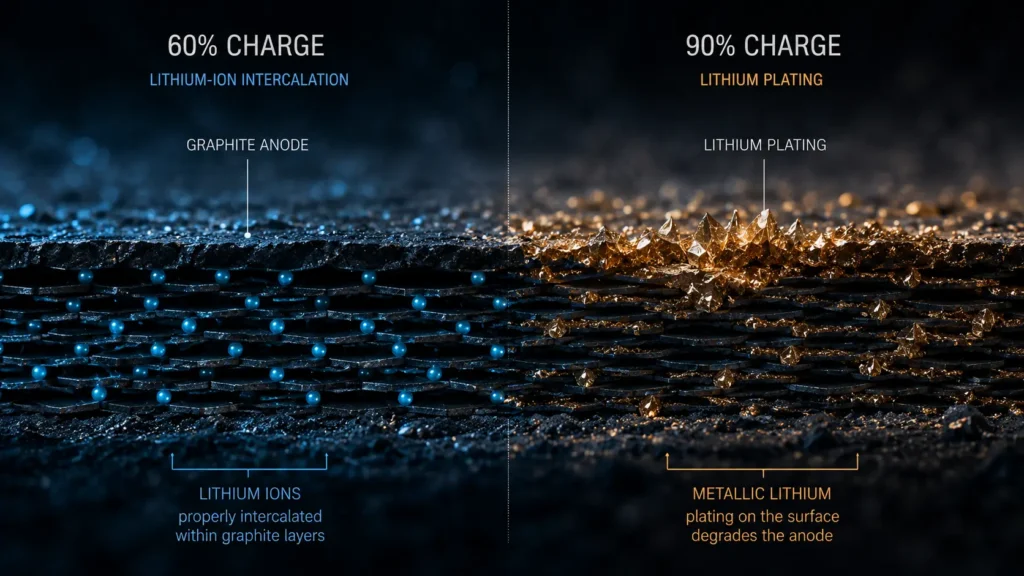
As more lithium ions reach the anode, there is less space for fresh ions to find a spot inside the anode. This creates a bottleneck, leading to several of these ions getting piled up on the surface of the anode instead of integrating properly.
When lithium ions can’t find a proper slot in the anode’s graphite structure, something dangerous happens: they start depositing on the surface as metallic lithium instead. This process has a name lithium plating and it’s the reason fast charging above 80% becomes both slower and genuinely harmful to your battery.
Lithium Plating: The Damage That Compounds Over Time
As voltage climbs in the upper charging range, the electrolyte inside the cells starts breaking down more aggressively. This breakdown produces gas, dries out portions of the electrode, and causes uneven current flow. The result is lithium plating, where metallic lithium deposits onto the battery’s graphite surface. That plated lithium reacts with the surrounding electrolyte, thickening a protective layer on the electrode called the SEI film and permanently consuming lithium that would otherwise store energy. Over time, this means less usable capacity.
Fast charging adds convenience, but it further stresses battery life as it can cause lithium plating. Charging in cold conditions can also drive plating and in addition to lowering the battery’s lithium capacity, the superfluous metal could potentially cause a fire.
That last detail fire explains why manufacturers don’t simply override the chemistry and push current harder above 80%. The Battery Management System deliberately throttles charging speed in the upper range not primarily to preserve battery life, but to prevent a genuinely dangerous situation.
The Two-Phase Charging System You Never Knew About
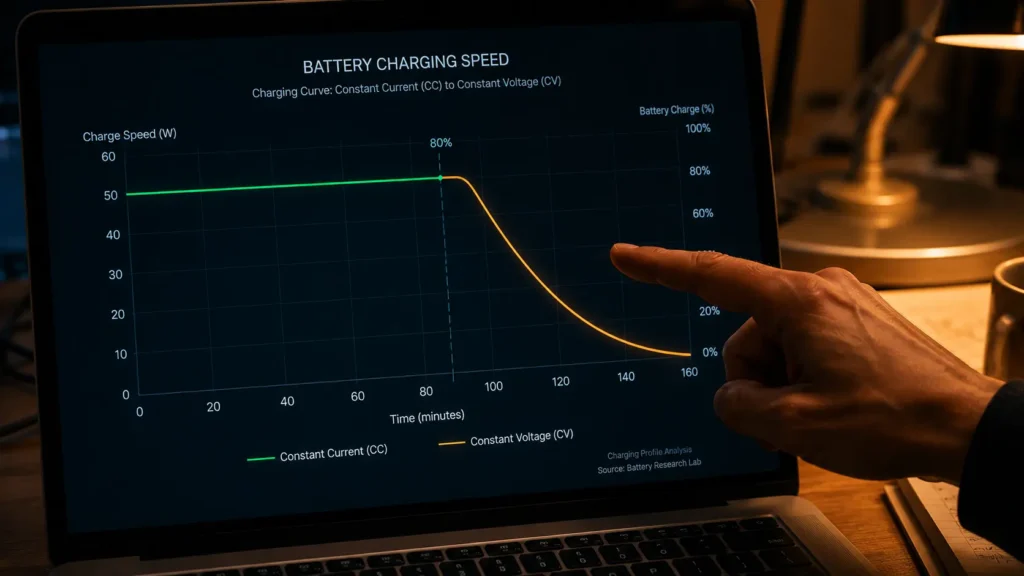
Standard lithium-ion charging uses a two-step algorithm: Step 1 is Constant Current the charger pushes a fixed high current into the battery until the voltage per cell reaches its limit. Step 2 is Constant Voltage the charger applies a fixed maximum voltage while the current gradually declines until the battery is full.
The fast charging phase you experience 0% to 80% is almost entirely happening in Step 1: Constant Current. The charger is pushing maximum current because the battery’s internal resistance is low and there’s room in the anode structure for ions to intercalate properly.
The crawl from 80% to 100% is Step 2: Constant Voltage. Lithium batteries charge fastest between 20% to 80% SOC beyond 80%, the charge rate slows to prevent overcharging and reduce cell stress. The physics don’t allow Step 1 to continue at full speed once the anode is approaching capacity.
This is precisely why modern smartphones reach 80% charge in under 30 minutes, while the last 20% takes almost as long again.
What Your Manufacturer Recommends And Why They Bury It
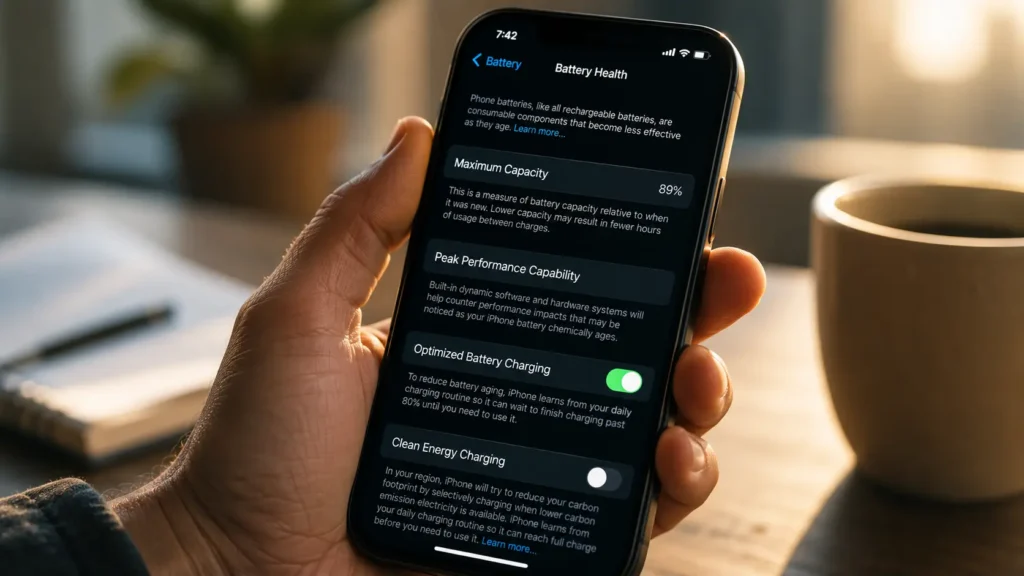
Major phone manufacturers like Apple and Samsung explicitly recommend capping the maximum charging level at 80%. EV makers market this method as one of the ways to minimize battery wear and tear. What they don’t explicitly state, however, is that waiting for the car or phone to reach 100% would mean significantly longer charging times given how battery charging speeds slow considerably after hitting the 80% mark.
Apple’s Optimized Battery Charging feature which learns your schedule and delays charging above 80% until just before you wake up is a direct engineering response to this chemistry. It’s not a feature designed for user convenience. It’s designed to minimize the time your battery spends in the slow, damaging constant-voltage phase.
The higher you charge and the longer the battery stays at high charge states, the faster it wears out. These principles hold across every lithium-ion chemistry.
The New Research Trying to Solve It
Engineers at Washington University in St. Louis have developed an operando microscopy platform that allows them to mimic the conditions of a battery under glass, observing exactly when and how lithium plating begins to form. Their 2026 research published in Small maps the fast charging safe limits for high-loading lithium-ion cells the first time scientists have directly visualized the moment batteries begin to fail during fast charging.
A separate research team developed a gamma-ray-driven SEI layer that allows a battery cell to be charged to 80% capacity in 10.8 minutes while maintaining long-term cyclability without extensive lithium plating pointing toward a future where the 80% bottleneck may be engineered around entirely.
That future isn’t in your current phone. But it’s closer than most people know.
What You Can Do Right Now
The practical guidance that actually protects your battery, based on the chemistry:
Stop charging to 100% habitually. Charge to 80% for daily use the last 20% takes longer and causes disproportionate wear. Reserve 100% charges for days you need maximum range.
Use Optimized Battery Charging. On iPhone: Settings → Battery → Battery Health & Charging → enable Optimized Battery Charging. On Samsung: Settings → Battery → More Battery Settings → Adaptive Charging.
Avoid fast charging in cold temperatures. Charging in cold conditions drives lithium plating and, in addition to lowering the battery’s lithium capacity, the excess metal could potentially cause a fire. If your phone is cold, let it warm to room temperature before charging.
Don’t leave it plugged in at 100%. Sitting at full charge keeps the battery in the high-voltage state where electrolyte breakdown is fastest.
The 80% cliff in your fast charger’s speed isn’t a bug. It’s the battery telling you something true about its own limits something your manufacturer understands perfectly and communicates quietly, in settings menus most people never open.
Note: Battery performance varies by device, battery chemistry, age, and temperature conditions. This article is for educational purposes only.
© AiwalaNews | Global Tech & Privacy Edition | May 2026
Read Also:
- 🔗 Your Phone Decides How Much Battery to Give Each App
- 🔗 This AI Ring Knows You’re Sick Before You Feel Sick
© AiwalaNews | Global Tech & Privacy Edition | May 2026
